mp3 players

#1036: Sleeping My Day Away

A sequel to #1029:  Lick It Up (In Bed)

RECORD STORE TALES #1036: Sleeping My Day Away

Insomnia ain’t no joke!  As a long time sufferer (since childhood), I have continually sought new ways to fall asleep.  Last time we checked in, I was looking at using my laptop and a small pair of laptop speakers to play music and rock myself to sleep.  I have since revised the setup and experimented some more, with promising results.  Here’s the scoop.

The idea of keeping my laptop near my bed, next to my alarm clock and night-time drinks, was not ideal.  I’ve spilled plenty of night-time drinks so the laptop was not going to suffice as a long term solution for music in the bedroom.  I’m sure kids today have more efficient ways of playing their music wherever they want, but I also require certain minimum levels of quality.  Gotta have stereo, not a single speaker, for one.  The sound quality has to be slightly better than my buzzy, bass-free laptop speakers.  And I have to be able to play my own music, because Spotify doesn’t have what I want.

I looked around for my old Sony mp3 player, but I couldn’t get it to charge.  I had a second Sony too, but it appears to be lost.  So, my parents bought me a new mp3 player for Christmas.  Yes, they still make them!  It’s an off-brand player called a “AiMoonsa”.  The Amazon writeup said it has an “HD” speaker built in.  I don’t know about “HD”, but it doesn’t sound too terrible.  It does violate my stereo rule.  Gotta have stereo.  Of course, stereo is available through the headphone jack.  What’s nice about this player compared to the old Sony is that it has a removable 64 gig SD card.  Easy to swap in and out, and upgrade if desired.  I find swapping just as easy.  I’ll always put my old Kiss albums on my mp3 player, and the rest of the space can be taken up by other favourite bands and new musical purchases.  The only thing about this player is the controls are a little clunky, and it doesn’t display cover art like the Sony did.  But I also only need it to do the bare minimum of work.  That being, playing mp3 files over a pair of speakers while I try to get to sleep.

I needed new speakers, so I ordered the standard Amazon computer speakers, the Amazon Basics USB speakers for $24 bucks.  This is actually my third pair.  I have a set at the lake and you’d be surprised how far you can hear the music up there.  I also have a set at work.  This third set is for the bedroom.

I needed a power source for the speakers, so I grabbed an extension cord and one of those USB cube charges.  A bit jerry-rigged, but it works.

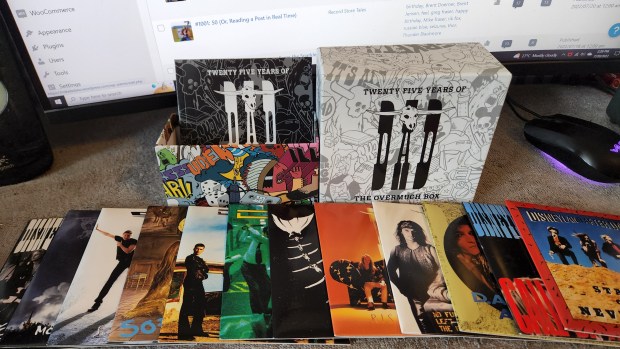
I loaded up the mp3 player with the aforementioned music, including my entire D-A-D collection as gifted to me by Thor.  Lemme tell something people:  D-A-D is a band with a deep, rich discography of awesome tunes!  Latter day stuff like “Empty Head”, “Something Good”, and “Everything Glows” are great tunes!  I put on the D-A-D compilation Good Clean Family Entertainment You Can Trust, and had a Christmas holiday nap.  And yes, “Sleeping My Day Away” was indeed the first track.

It was perfect!  The music sounded good enough (certainly better than when I used to fall asleep to music on cassette in the 80s).  The D-A-D did the trick, as tune after tune rocked me to sleep.  I fell asleep mid-way through the disc and stayed that way for a couple hours.

Now, who’s to say that I wouldn’t have fallen asleep that day even without the music?  It was a good nap though, and I enjoyed falling asleep that way, like I used to.  Jen came in to nap too, and whaddaya know?  Now she’s a D-A-D fan.

Mr. and Mrs. LeBrain fully endorse D-A-D.  Now go get some!

#563: ID3 Request Error – Check File

GETTING MORE TALE #563: ID3 Request Error – Check File

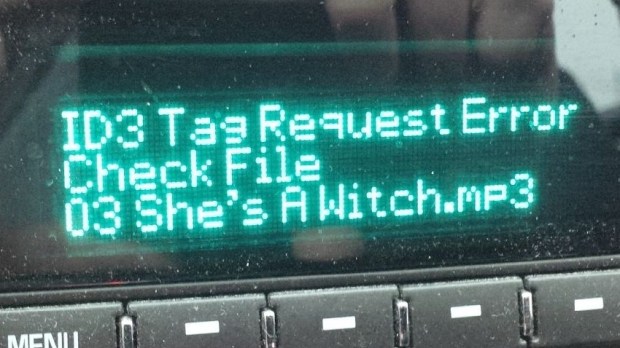
Ever seen one of these errors on your media player of choice?

Let’s start by talking about what an ID3 tag is, in case you didn’t know.  If you play music files, then you use ID3 tags.  These tags contain the metadata about your song files.  You know that info that automatically pops up on your player?  Artist, album, cover art…that’s from your ID3 tags.  There is free software out there to edit your songs’ tags, although such features are bafflingly not standard in Windows.  I use a combination of two:  Audio Shell, and Mp3tag.  They have different user interfaces, but more or less have all the features you need.

Sometimes my Sony Walkman mp3 player can’t pick up the cover art, but that is rare.  The tracks will still play.  The error that has caused me problems for years comes from my factory installed GM car stereo.  Otherwise, it’s a great player, but sometimes it hits an ID3 tag it doesn’t like and I get an error message.  It reads:


ID3 Tag Request Error
Check File


When I get this message, the songs will not play.  I first ran into that issue about four years ago.  When it does happen, it’s usually on something that I recorded with Audacity, like vinyl or cassettes.  Audacity can write the ID tags for you when you export the files to mp3.  The error message here doesn’t give much detail.  It’s not the cover art; that was the first variable I checked.  I’ll get this error message with or without cover art.  It’s frustrating when you can’t play an album in the car, and only the car.

This baffled me for years.  “Check File”, eh?  I did – many times.  Changing this, changing that.  Writing the ID3 tags with different software.  Nothing worked.  Googling solutions wasn’t very helpful.

I recently came across the solution, and it was so obvious I don’t know why I didn’t think of it earlier.  Probably because I was looking for something easier.

Just erase all the ID3 tags – all of them – and start from scratch.  Both Mp3tag and Audio Shell have easy features to do exactly this.   Most ID3 editing programs will allow you to completely clean all tags from the file.  Once that is done, start over, manually.  By hand, enter the song titles, artist, album title, artwork and (very importantly) the track sequence.  You’ll want to make sure you get that right.  Once you’ve done that the mp3 file will play just fine, as seen below.

Enjoy the music!

Before & After


REVIEW: Sony Walkman NWZ-E353

This is an old review, but I thought it relevant to post, because of the way that the Sony Walkman changed my music listening habits.

IMG_20140615_080150SONY Walkman NWZ-E353

For years, I had avoided going digital. I had an old iPod. The little one with no screen. It was awful. Syncing with iTunes? Why can’t it be simpler? When I listen to a CD, I drop it in and push “play”. No syncing, no trying to understand iTunes. That kind of simplicity is what I’m looking for. Then I had another iPod, a Mini, which was even worse; the battery was useless and it couldn’t power up. Plus iTunes is just awful, I don’t care what the Apple fanatics say. It’s not an intuitive program in the least. Why can’t it be easier?

I decided to pick this Sony Walkman up and I’m glad I did. It has revolutionized the way I listen to music. Before I had gotten to the point where I was only listening to music on CD in the car and occasionally at home when Mrs. LeBrain was out shopping. Now, I can have music going almost anytime I want, morning noon and night.

And it’s easy! Drag and drop! How much simpler can you get? Because I’m a bit OCD, when I rip a CD I edit my ID3 tags to get the cover art going and make sure the tracks are in the right order and so on. But it’s so easy, and I’d do anything to avoid having to use iTunes.

I don’t even care about the 4 meg size on this model. When the player gets full, I just delete some albums that I’ve played enough, and add some more from my computer.  Drag and drop. Easy! I rip my CDs to the highest quality MP3 possible, so I really only get about 25 albums on here at a time. But that’s plenty — when am I going to be away from my computer long enough to listen to 25 albums? It’s never happened. I’d have to charge it first anyway. Maybe I’ll upgrade one day to a player with bigger storage, but I don’t see the point right now.

IMG_20140615_080220The only modification I did was to buy some better, more comfortable ear buds. I’ve been through a few different pairs. With that combination, I have the best quality portable music that I need. I also bought some portable speakers but they go largely unused. I prefer to plug my player into the AUX IN jack of a stereo, and I’m off to the races.

The Walkman has some customization available, such as wallpaper, photo galleries, etc. It has this thing called “SensMe”…it’s supposed to pick music based on moods. I could care less, I don’t listen to random songs, I listen to albums. I prefer to listen to songs in the context in which they were meant to be listened to. There’s a fine sounding FM radio as well. There’s a video player but it seems to be quite finicky as to what type of files it will play, so I don’t use that feature. I had no desire to, anyway.

Battery life is excellent. It has battery saving software as well. I can listen to music all week, as often as I can squeeze it in, and only charge it once a week. It is charged with the included USB cable. Easy, easy, easy.

Whether I am listening to heavy rock, classical music, country, or jazz, I have had no issues at all with the sound quality. For example right now I am listening to Ryan Adams’ Demolition album. The bass frequencies are strong but the clarity of the acoustic guitar is stunning! The only music that suffers is live music. As you know with a live album you have the continual backdrop of crowd noise. An MP3 player places a split-second pause between every song, which goes unnoticed on studio albums. On live albums, it breaks up the crowd noise slightly and can be distracting. Not a huge deal, but I aim to be complete in my reviews.

So, enjoy this awesome MP3 player. Here are my 5 basic tips to the best listening experiences!

1. Rip your CDs to the highest possible quality. Don’t download.
2. Grab a free ID3 tag editor for maximum enjoyment — add cover art, correct spelling mistakes or track order.
3. Buy a good pair of comfortable earbuds to maximize the sound quality.
4. Use the battery saving software.
5. Throw out your iPod.

Enjoy!

5/5 stars