call me maybe

Part 180: Google

RECORD STORE TALES Part 180:  Google

We first got email and internet at the record store in the late 90’s.  One of the big fears back then was the dreaded computer virus, but of course we also had to deal with internet abuse.  I remember coming in to work one day to find our computer’s MSN Messenger still active from the night shift; Spoogecakes left herself logged in.  Myself, I was never that fussed about MSN, I was more an email guy.  I got busted emailing a few times, I had verbal warnings, but I never did anything like leaving myself logged into MSN!

The powers that be were concerned about time wasted on the internet, and the viruses. This put into effect a strict internet policy.  Part of that was blocking nearly every useful site on the internet.  There were only a handful of sites available to us.  There was a secret password override, which made the rounds once leaked.  The guy who figured out the password decided to share it on his very last shift.  His name shall go down in hallowed halls, somewhere, someday.

Some of the sites that we were allowed to access included Canoe, so we could print out the charts, and Allmusic so we could do album lookups.  Allmusic was next to useless, being so slow and inaccurate.   I preferred Google.  The beauty of Google was that you didn’t have to use it to actually go to another (potentially shady) site, you could use it just to answer a simple question.  For example:

CARLY RAE JEPSEN

So there’s your answer, without even having to click on one of those shady lyric sites.

Now, I showed my bosses how to use Google to answer the toughest customer questions.  Often, a customer would come in and say, “I’m looking for a song, but I only know a few words.  Can you help?”  This was long before you could hold up your iPhone and use an app to do it for you.  You had to ask the folks on the radio, or at the record store.

Google was the easiest most accurate way to answer these questions.  So, here’s a question you might get:  “I’m looking for a song by somebody that goes, ‘in the midnight hour, I want more more more'”.

Plug it into Google like so, and you get your answer.
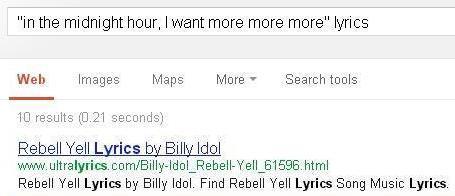
REBEL YELL

Again, you don’t even have to click on the shady lyric sites.  Then once you know the artist (Billy Idol) you could just run over to the shelves and see if you had that song.  If you didn’t, Allmusic could tell you which album you want, now that you knew the name of the song and artist.

I showed them this trick, but they would not budge on the block policy.  They insisted that Google be blocked.  They thought you could use Google to visit a blocked site.  Just clicking the link, they thought, would bypass the block.  They thought the block only applied to the address bar.

I explained this but the answer remained “No.”  Google was to remain blocked, purely because they didn’t understand how Internet Explorer worked.  Essentially, we were blocked from a simple tool to answer common questions.  At least many of us secretly had the override password, but before that leaked, we couldn’t access a search site like Google.  I had a customer say to me, “Can’t you check the internet?  The guy at HMV can.”  And no, technically I couldn’t.  Allmusic didn’t have a feature to look up song lyrics, and its search engine was pretty shitty as it was.

With today’s technology you can do this easily with a cell phone, that was unimaginable to us 10 years ago.  Regardless of the policy, I used the password to use Google and answer questions.  And I checked my email, too!

NEXT TIME ON RECORD STORE TALES…

Part 181:  Jim Carrey’s clone

Part 94: Staffing

Everybody and their little brother wanted to work in a record store.  Why not? It’s the Dream Job.

For most record stores, I imagine staffing is not an issue.  Anybody who can Google can tell you where to buy “Call Me Maybe”, today.  For us though, we were buying and selling used.  We could buy 200 discs in one average day, and might have to look at 600 just to find 200 good ones to buy, plus all our staff were required to be qualified buyers.  It was what set us apart from other stores – you didn’t have to wait for a specific person to sell your stuff.  It would usually take up to 3 months to get a new inexperienced staff member fully trained on everything, including buying.  Someone with experience in a record store might get there in a month or two.

Everybody was always shocked when they heard that.  3 months?  What the hell did it take 3 months to teach people?  A lot.  A lot of kids were looking for a summer job, but there’d be no point hiring a kid for the summer.  If we didn’t get a year out of an employee, it wasn’t worth the training involved!  That was a disappointment for many many kids who wanted to work with us for the summer.  Some just lied and said they would stick around, but bailed at the end of the summer anyway.

Here’s a brief list of things we had to tackle before we even got into buying:

  • Simple things like, how you approach a customer to see if they want help without being annoying.
  • Getting an idea of our quality standards (the highest in town) and policies.
  • Replacing cases – when and how?  You don’t want to waste fresh cases for no reason, and we replaced hundreds a day.
  • Checking and cleaning the CD before selling it – then double checking again to make sure you put the right disc in the case!
  • Looking stuff up inventory, in multiple ways – artist, soundtrack, etc.  This was challenging to those who could not spell/type.  I remember training one guy who could not type “Polyphonic Spree”.  Nope, he typed everything but.  “Polyphonic Speer” was one memorable variation
  • Looking up stuff online for more information. (We had to use Allmusic but I found Google and Wiki more useful – shame that use of Google was blocked on our system for fear of “mis-use”!)
  • Finding that stuff on the shelves once you know it’s in stock.
  • Filing CD’s away in the correct sections.
  • How to handle overstock.
  • How to do the data entry of entering new titles.
  • How to check other stores in the chain for inventory.
  • How to do cash, credit and debit transactions.
  • How to count change properly (if you wanted to balance at night, you had to teach it)!
  • What to clean, when to clean it.
  • Cashing out – how to do it, and how to balance.

Doing all this stuff took about 3 weeks.  There was a lot to remember without hammering them with buying CDs and all the different pricing schemes involved. When we taught our kids how to price discs and what to offer, we had a pretty good layout, but our pricing lookup in our computer system was limited in its usefulness.  Any time a CD got reissued, it got another listing in our catalogue. Some of these reissues might have been physically identical, so for kids to figure out which discs they were looking at was very tricky.

Our computer system had no pictures and no track lists and only a limited amount of info available.  When you get multiple versions of a disc coming in, it could get confusing.  A listing could look like this (but without the helpful but hilarious cover art):

  • Ladano, Mike – LeBrain’s Greatest Hits (1995 1 CD remaster Capitol Records)
  • Ladano, Mike – LeBrain’s Greatest Hits (remaster reissued)
  • Ladano, Mike – LeBrain’s Greatest Hits (14 tracks)
  • Ladano, Mike – LeBrain’s Greatest Hits (2002 remaster)
  • Ladano, Mike – LeBrain’s Greatest Hits (bonus DVD)
  • Ladano, Mike – LeBrain’s Greatest Hits (original)

So imagine some guy coming in with a box of CDs, and every second or third disc you look up had that kind of info for you to sift through – all different prices too!  And God help you if the CD was not listed in the computer and you had to make a “manual” decision!  And lots (lots!) of great music was not in our computers.

You can’t just teach this stuff – it has to come from experience and seeing the same thing come in over and over again.

And none of that even touches on quality.  When we looked at disc quality, we were probably the most anal store in town.  The stuff other stores would sell as “good condition” wouldn’t even make our shelves.  This was a good thing at the point of sale, but very difficult for staff members to deal with when purchasing discs from customers.  They had to look at:

  • Scratches – very carefully.  Anything visible?  How deep?  Can they be buffed out?
  • Can you feel the scratch with a fingernail?  If so, it cannot be buffed out without taking the chance of destroying the CD.
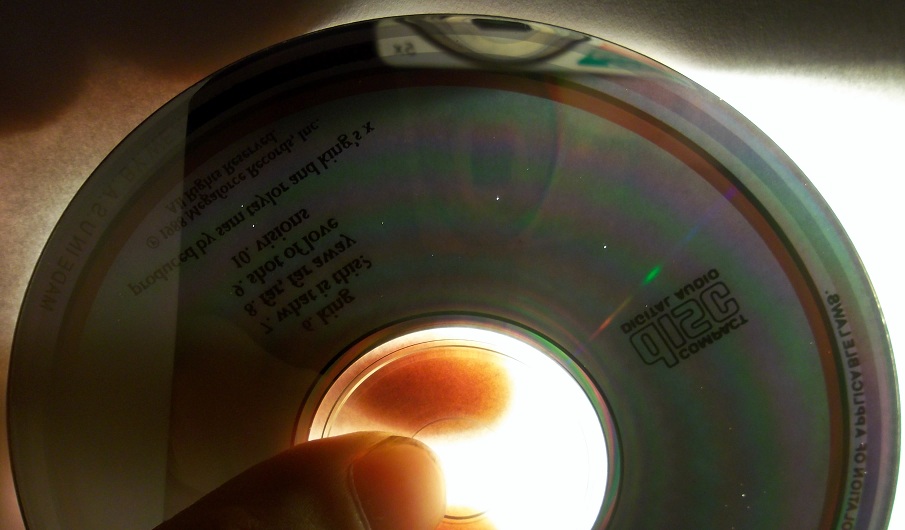
  • Top scratches – the most deadly of all scratches.  They are on the thin top of the CD and actually cut into the aluminum.  Cannot be fixed, but can be seen shining through bright light.
  • Pinholes – don’t usually effect sound quality unless massive.  Can also be seen shining through with a bright light.
  • Packaging – are all elements present?  Front cover, back cover?  Any water damage or rips?
  • Is anything missing?  For example, was it supposed to be a two CD set, but a disc is missing and case changed?
example of pinholes

example of pinholes

And that doesn’t even factor in such things as, “How many copies do we have?  How many copies do our other stores have?  Do we really need to spend time buffing scratches off a Spin Doctors disc, when another store has 4 copies?  None of this stuff can be taught overnight.

So, when kids used to ask me for a summer job, and I would say no – this is why!  I’m sorry I let you down back then, but there was no way I was training you on all this shit for 3 months for you to only stay 3 months!