Audacity

#855: Some Of My Favourite Fest Intros (and One Outro) 2020

As always, I was asked to introduce songs at this year’s Sausagefest.  I’d like to share some of them with you so you can get a taste of what I do for the Fest.

These four are only some of my favourites this year.  I did 10 intros altogether and the longest was about nine minutes.  That’s my actual favourite, but it was less about the track intro, and more about inside jokes that mean nothing to you.  I also did a well-received Neil Peart tribute as part of my “Passage to Bankok” intro but you can just read it here as it was previously posted in its original text form.


Below is a medley of four intros and one outro.  Some notes before you proceed:

  • Because it’s 2020 and why the fuck not, I understand they did the countdown in reverse order this year.  Starting at #1 going down to #100.  I didn’t know that when I recorded these.
  • I like to lift bits from cartoons like Rick & Morty and American Dad.  You will hear some.  These are not my original bits, just funny things that work as transitions from whatever Tom & Meat had going on before me.
  • Afroman has been a point of contention. I do not believe Afroman has a place at Sausagefest but they vote it in every year and then make me introduce it.  This year I fought back by putting in 0% effort.  (50 second mark)
  • Better than the Afroman intro was the outro which you will also hear.  I “interviewed” Werner Herzog about Sausagefest and people that vote for Afroman. (2 minute 15 second mark)
  • The Herzog bit was probably the most complex to edit.  I downloaded random Werner interviews and found a perfect part where he was talking about chickens.
  • Getting Darth Vader on Cameo was a real stroke of luck! (3 minute 45 second mark)


* I had to surgically create the word “one” out of the word “chicken” in order for it to make sense.  Now you’ll notice but before you wouldn’t.

#482: Modified Listening Experiences

AUD 1

GETTING MORE TALE #482: Modified Listening Experiences

With modern music technology and software, it has never been easier to not only take your music anywhere, but now you can even modify the albums you buy.  Using some simple tricks you can change aspects of the tracklist to make the album suit you.   You have probably done this yourself.  Many do regularly, by shuffling the track order.  Let’s go a little deeper than that.

The first time I experienced the concept of modifying an album’s tracklist, I was just a kid.  It was 1985, and I was recording the first W.A.S.P. cassette off my next door neighbour George (R.I.P.), from tape to tape.

“If you don’t like the song ‘Sleeping in the Fire’,” he said, “You can just push pause on this tape recorder.  Then un-pause it when the song is over.  Your copy won’t have ‘Sleeping in the Fire’ if that’s how you like it.”

Even then, I couldn’t imagine a reason to copy an entire album sans one song.  I kept the tape running and never hit pause, but George’s advice kept tumbling around in my brain, for years.   Over time I began experimenting with tracklist modification.  Never to remove songs, mind you, always to add or improve.

Here are some examples of modified track lists in my library.

1. Adding bonus tracks
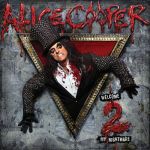
COOPSingle B-sides just kind of float around in most collections.  Due to their short running time, I don’t often spin CD singles.  On a PC hard drive they tend to get lost while full albums get more play.  To give some of these B-sides a little more air time, in many cases I have chosen to add the songs as “bonus tracks”, at the end of the associated album.  This works best when it’s just one or two tracks.  More than that can extend an album listening experience too long.

Sometimes, different versions of albums will have unique bonus tracks.  Perhaps there’s one on the vinyl version that is on nothing else.  Japanese editions, deluxe versions, European editions, iTunes editions…there are usually lots of bonus tracks out there, but always on different versions of the disc.  Why not take them all, and make your own “super deluxe edition” with all the bonus tracks in one spot?  Listening to an album modified in this way can be a bit longer than the usual, but ultimately it’s rewarding to hear the entire body of work in one smooth sitting.  My MP3 player is loaded with my complete version of Alice Cooper’s Welcome 2 My Nightmare, and it’s just 10 minutes shy of two hours long!

In extreme cases, there are so many bonus tracks out there that you may need to consider creating an entire “bonus disc” folder to house them all.

2. Removing gaps

The 1990’s were such a quaint time.  Remember “hidden bonus tracks”?  At the end of the album, instead of stopping, the CD would continue to play several minutes of silence.  Then you would be surprised by a hidden unlisted song!  A notable example is “Look at Your Game, Girl”, the infamous Charles Manson cover that Axl hid away at the end of The Spaghetti Incident.  There was only a 10 second gap on that CD; still annoying but other albums had much longer pauses before the hidden track.

I use Audacity to remove the long gaps, or to isolate the hidden song to a track all its own.  As much as I enjoy a “pure” listening experience the way the artist intended, these long gaps are pretty easy to sacrifice.

3. Restoring an intended song order
AUD 4

Rock and roll is full of stories about bands who couldn’t get their way when an album was released.  W.A.S.P. for example wanted their song “Animal (Fuck Like a Beast)” to open their self titled album.  Now you can add it there yourself!  (W.A.S.P. also added the song to the start of the remastered version of the album.)  You can even use Audacity to adjust the volume levels, so that everything matches.

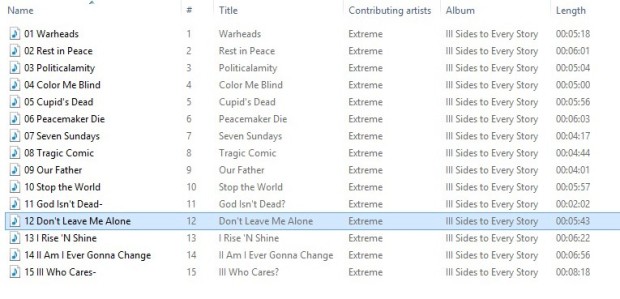
A better example is Extreme’s III Sides to Every Story.  The piano ballad “Don’t Leave Me Alone” was only on the cassette version of the album.  The CD couldn’t contain all the songs without making it a double, so that one had to be left off.  Now you can re-add it yourself, right where it belongs at the end of “side two” and before the big side three suite.  Now you can hear the whole album as Extreme intended, seamlessly.

Pardon the pun, but I took an even more “extreme” approach to their second album, Pornograffitti.  The instrumental track “Fight of the Wounded Bumblebee” was written as a longer piece with a slow bluesy coda.  This second half was recorded solo by Nuno Bettencourt as “Bumble Bee (Crash Landing)” for a guitar compilation.  Using Audacity, I combined both tracks to restore the song to its original full structure.  This is about as close as we will ever get to hearing the tracks as written.  I dropped the new longer track into the album tracklisting and voila!  Still seamless, but now with a new darker mood before “He-Man Woman Hater”.

Indeed, the possibilities are limitless.  Steve Harris often complained that the Iron Maiden album No Prayer for the Dying should have had live crowd noise mixed in, like a live album.  Now you can do that yourself.  With a deft touch, you can even edit songs down yourself or extend them by looping sections.

With the advent of the computer as a listening device, the sky is now the limit.  How would you modify your listening experiences?


#363: The Art of the Mix CD

For more reading of this nature, I recommend the 1001 Albums in 10 Years site, by Geoff.  He is always posting interesting musical nerdiness like this so cheers to Geoff and his excellent site.

IMG_20150124_085622

RECORD STORE TALES MkII: Getting More Tale
#363: The Art of the Mix CD

We have come a long way from the mix tape. If you’re of a certain age, you probably made many mix tapes. I know I did. Dozens upon dozens, spending hours doing so. We had to make the tapes in real time. I would meticulously cue up the tapes so there wouldn’t be excessive gaps between songs, or awkward edits. I couldn’t have a song getting clipped at the start or finish. Mix tapes were a matter of pride and I sank a lot of time into making them, from the recording to the J-card. Sometimes the tapes were for me, but most often they were for someone else (usually a girl I was trying to woo).

Making a mix CD is much easier than making a mix tape. Still, for my level of perfectionism, it requires a lot of work and attention to detail. I have certain “rules” that I always adhere to, when making a mix CD. In the past, I have burned and then thrown away many CD copies that did not meet my exacting standards. I would not settle for a mix CD with an annoying flaw in it! My friends deserve better!

Here are my rules:

1. All songs must be more or less equal in volume.

Nothing worse than diving for the volume knob when a song that was mastered waaaay too loudly comes on! Nero has a built-in “normalize” function that analyzes and automatically equalizes the volume on all tracks. However it doesn’t always work well. It can create volume swells within an actual track that weren’t there before. I do not use this feature any longer. Now, I use Audacity to raise or lower a track’s volume manually, before adding it to my mix.  Painstaking, but you get better results.

GOB2. All live songs must have fade-ins and fade-outs.

I cannot stand the sound of crowd noise starting and stopping abrubtly. I add my own fade-ins and fade-outs. Sometimes this is tricky, because certain live albums may have the song breaks in odd locations. There may not be enough room at the start or end of a track. So, sometimes I have to manually add in enough crowd noise to enable a fadeout, a time consuming fix. I also enjoy doing the occasional cross-fade between songs, which used to be very hard on Nero but is easy as pie with Audacity.

3. CD must have a start, middle and ending.

All tracks are carefully selected for each one of my mix CDs, but usually there are several contenders for opening and closing songs. I try to create a flow, with slow parts and heavy parts, through the disc, with a dramatic climax. I don’t always succeed but my goal is to create a mix CD that works like an album. It has to have a direction.

4. Throw on a rare track.

It doesn’t matter who I’m making a mix CD for, I want an obscure song or two on there. I don’t want to make a mix CD entirely of songs you already know. I want to surprise you with something I know you’ve never heard before, but will probably like.

5. All songs must be properly labelled.

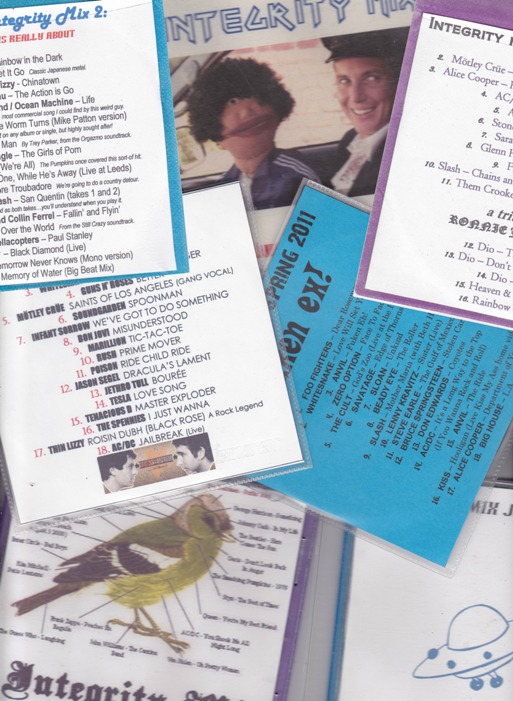
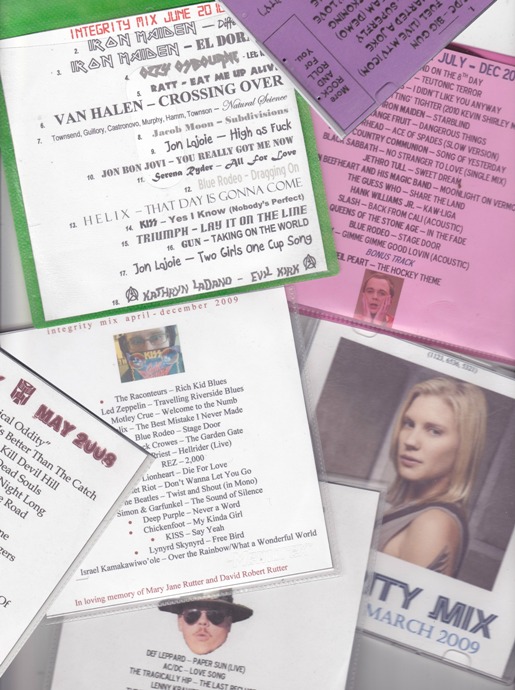
Don’t you hate getting a CD from somebody without having a clue what’s on it? Every CD I make for a friend comes with a computer generated cover, including full and accurate track list, down to every punctuation mark and detail. Sometimes I’ll even throw some pictures or logos on the cover for fun, if there is room. Nero also encodes the song and artist names onto the CD. So I have to make sure the file names are all done correctly too, because when you pop my mix CD into certain players (like my car deck) you’re going to see the titles come up automatically. This must always be done correctly. No spelling mistakes, or I’d junk it, and make a new one.

And finally, there is the optional not-rule:

6. Optional – Include short, funny bits between songs to surprise the listener.  

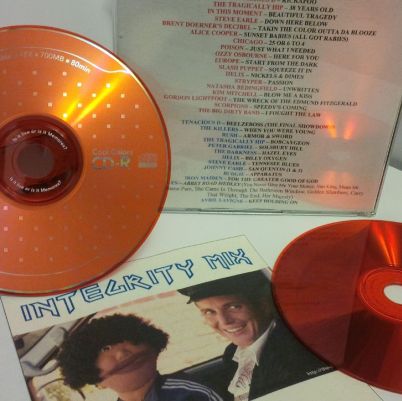
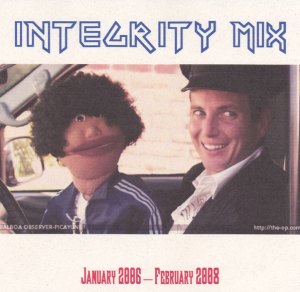
This only applies in certain circumstances.  The “Integrity Mix” CD shown here, with G.O.B. and Franklin Bluth on the cover, has such bits at strategic points.  One is the song “Big Yellow Joint” from the show Arrested Development, and the other is the appearance of the “Hot Cops” busting George Michael from the same episode.  You can see I wanted to keep those bits a surprise for whoever ends up with a copy, because I didn’t number the tracks and didn’t list the bits.  So in a sense they are “hidden” until the listener stumbles upon them.

Are you as picky as I am, or is your quality control as extreme as mine? What are you own techniques in the art of the mix CD?

MIX_0002

MIX_0001